
Loading...
Loading...
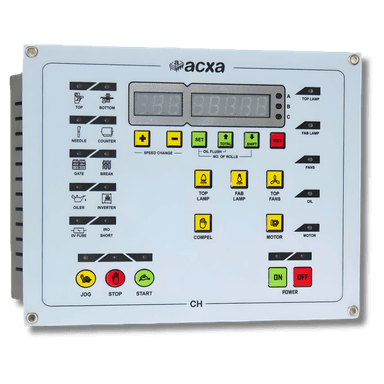
Replace your existing circular knitting machine panel with the CH270. Standard 270x210mm size fits most medium-format machines.
Switch off the machine breaker. Disconnect the main power cable. Wait for all indicator LEDs to turn off.
Verify zero voltage with a multimeter before touching any wiring.
Remove the mounting screws from the old panel. Carefully disconnect each wire, labelling them as you go. Photograph the wiring layout before disconnecting.
The CH270 fits the standard 270x210mm panel cutout used by most Chinese and Taiwanese machine manufacturers. Align the mounting holes and secure with screws.
Connect the power supply, motor relay, sensor inputs, and IRO protection wires according to the wiring diagram in the user manual. The CH270 uses the same standard plug layout as most replacement panels.
The CH270 uses the same connector pinout as the CH310 (smaller form factor, same wiring).
Restore power. The CH270 should boot and display the main screen. Test RUN, JOG, speed control, and accident prevention features.